Showing posts with label Quick Quest. Show all posts

Friday, August 16, 2013

Top 5 features you should know about question paper setting software

This post highlighting features of question paper creation software- Quick Quest.

1. Use your favorite word processor for Advanced Formatting

If you wish to perform specific advanced formatting on the generated question paper and if you feel options provided in question paper preview editor aren't enough, just don’t worry! Do the following,

- Select all and copy preview of generated question paper


- Open your favorite word processing editor, for example Microsoft Word

- Paste your content

Do the formatting as you wish and print!

2. Extract Text from Scanned Question Paper

Scan previous question papers as JPG image with better and bigger resolution, let 'Quick Quest' question entry editor extract text for you.
The character recognition engine integrated with Quick Quest helps you avoid typing huge archive of past question papers.

Read this post to see step-by-step instructions: http://srushtisoft.blogspot.in/2009/05/qq-ocr-feature-extract-text-from.html


3. Shuffle questions with a click

Choose question paper of any format and click “shuffle”! Yes, its that simple!


4. Control user access to a particular subject

Secure question bank by defining proper subject-wise access rights to each user. Let a teacher/educator access only his/her subject and not others!

Explore more about Quick Quest user access rights here: http://srushtisoft.blogspot.in/2012/02/quick-quest-20-user-account-types.html


5. Generate answer paper

Generating answer paper for a saved question paper is just one click away!


Friday, December 7, 2012

Quick Quest Editions Explained

This post should serve as a useful reference to our potential customers whenever they face a choice between different Quick Quest editions. All editions provide similar features and its only the deployment strategy that categorize Quick Quest into different editions.

Desktop Edition

It is a stand-alone edition perfect for individuals. The software gets installed on a Desktop or Laptop (even with latest Windows 10 operating system) and store data (questions, answers...etc) on the same computer.

Licensing: It is one license per computer model. The single registered copy of the Quick Quest software will only work on the computer where it is installed and activated by the activation key supplied by us. If you want to run this software on another computer, you will have to purchase (perhaps, SrushtiSoft may offer you discount in this case) a new license.

Network Edition

Network Edition is specially designed for more people from different departments (situated in different buildings or floors) to work seamlessly in a campus having private computer LAN setup. Quick Quest Network Edition is made to serve in real-time client-server mode.
  • Different users sitting with their machines (having Quick Quest installed) can all log-in at a time and work in parallel without affecting each other's work.
  • All data entered by Quick Quest users stored in the central database server. Therefore person sitting in 2nd floor of a building can check data entered by the person sitting in 10th floor.
  • Quick Quest user security settings empower administrators to control data sharing across different type of users in the network. 

Licensing: Proper LAN setup is a pre-requisite and our technical team will do the rest of the Quick Quest network software installation. Like with Desktop edition, the per-computer licensing works here as well. Only registered client computers are allowed to run Quick Quest and connect to database server. Any new computer addition with Quick Quest client install requires procuring a client software licence. Don't forget to ask for discounts if you are placing order for 5 or more Quick Quest clients :) One server and One client software purchase is mandatory to get start with Network Edition.

Cloud Edition

This eliminates the need of having campus/building wide private LAN setup and a dedicated server maintenance. Individual desktop or laptop with internet connection (minimum speed expected is 512kbps) is well enough to go for cloud edition. All data entered gets saved in the cloud server and any team members (with proper Quick Quest user account credentials) can securely access question bank from any part of the world! Along with Quick Quest Cloud edition software, you also need to subscribe for Cloud database service. Customers are free to choose their preferred cloud service providers (like Windows Azure, Amazon...etc) supporting SQL Server 2008 or higher. We will be doing the setup of cloud database server.

Licensing: Licensing model is same as Network edition in addition with 3rd party cloud hosting service provider charges.

----------------------------------

Minimum Hardware Requirement Specification

Client Machine

  • Intel and AMD processor with 1GHz speed.
  • 1GB RAM
  • 2GB Harddrive
  • 17" Monitor with resolution setting 1024x768 for better view
  • Internet connection (for remote installation, online assistance or troubleshooting only when needed)

Server Machine (only for Network Edition)

  • Intel and AMD processor with 2GHz speed.
  • 2GB RAM
  • 5GB Hard drive
  • Internet connection (for remote installation, on-line assistance or troubleshooting only when needed)

Minimum Software Requirement Specifications

  • Windows XP SP3 or higher, Windows Vista SP2 or higher, Windows 7, Windows 8, Windows 10, Windows Server 2003 SP2, Windows Serve 2008, Windows Serve 2012. All preferred in 32 bit, however Quick Quest can also be recompiled for you in case if you are using 64-bit windows operating system.
  • Microsoft Dotnet 4.0 Runtime Installed (download here)
  • Microsoft Office 2003 or higher. (Optional).
  • Microsoft SQL Server 2008 Express Edition (download here). This is only required for Quick Quest Network and Cloud Editions.


Thursday, February 9, 2012

Quick Quest on Facebook

Like any other popular product based software company, we are also tempted to publish about Quick Quest on Facebook, so we did it :)

Please mark your 'like' on the page and help spreading the word about Quick Quest!

http://www.facebook.com/pages/Quick-Quest/309455549101901

Thanks for your time and consideration!

Quick Quest 2.0: User Account Types

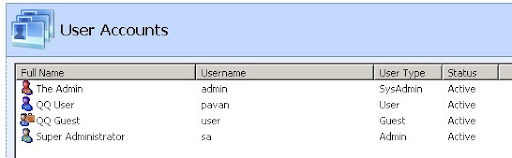
The Quick Quest Professional Edition 2.0 supports 3 types of user accounts to create and manage the system.
  1. Admin
  2. Guest
  3. User

1. Admin
Any Quick Quest user who is of type 'Admin' is as equal to GOD in Quick Quest system. He/She will have full permission to operate any function in the system.

So all Quick Quest features are accessible to this account. All those features can be found here.

This is the only type of user allowed to set question paper pattern and generate (store and lock) questions papers for up-coming examinations.

2.Guest
Users of this type can do 2 major activities,
  1. Manage questions-with-answer in the bank. i.e, any question-with-answer can be added/edited/deleted by this type of user.
  2. View, Print, and Correct question and answer papers (papers can be previously distributed in the exam hall and planned for future exams).
This user is not allowed to set question paper pattern and generate questions paper.

3.User
This type of user is best suited for data entry and that's why only questions-with-Answer management screen is allowed to access.

User type accounts not permitted to view and generate question and answer papers.

Oh...yah! There is one more account called ‘System Admin’. It was not listed with above 3 users type. There is special reason for it. This user is highly privileged and only one account will exist in the Quick Quest system. Even if you try to delete it, you can’t! reason?
There should be an account even when there are no users exist or created in the system. This user is a starting point for everything when Quick Quest is newly bought by the institution and all other things need to be defined/created.
Functionally, 'SysAdmin' is no different than 'admin' user type, except that it can not be destroyed/deleted.

That's all about Quick Quest users!

Hope these user accounts (with different access levels) are pretty much enough to manage questions-with-answer bank and examination papers in a secured and systematic way.

Thanks for reading and please feel free to post your queries/feedback in the below comments section or email us.

Tuesday, January 31, 2012

Quick Quest 3.0 is Getting Ready!

We are busy with Quick Quest feature additions and stabilization. The new set of features will be shipped as "Quick Quest 3.0".

Really, we are excited about the new installment of Quick Quest after (close to) 2 years! The new version has some really cool features and we are sure every education institute planning to use this will indeed benefit more.

The new version of Quick Quest will be available from 10 Feb 2012. Sorry, though all technical tasks are finished on time (you can check them here), the business team is planning for the better and bigger launch  of Quick Quest 3.0 after few months!! So, those who are waiting for Feb 10, 2012 release, our sincere apologies.

Not only this, we are also working on Quick Quest's offers. We are quite positive about our upcoming software purchase offers will certainly stand reasonable for all type of users like Free, Individual with less budget, Individuals and Institutes looking for feature rich version, LAN and Cloud based editions...well :) we will post a separate update on this, so till then keep visiting here or subscribe us to get automatic blog post notification in your mail box).

So, coming back to QQ 3.0 related activity updates, we hosted a open-tracking system - Srsuhti-Soft Developments, Its the place where you can smell what's cooking inside SrushtiSoft lab!

Quick Quest 3.0
Roadmap: Quick Quest 3.0 Release items
Current change log:  Features ready to ship

In case if you find any important feature we missed to consider, please shoot an email at us: team@srushti-soft.com, we will consider it with no more delays. As you have anonymous access to our tracking system, you can spy on us checking whats going behind the scene about your request. As our team is using the same Srushti-Soft developments tracking system, 100% transparency is guaranteed :)

Thank you.

Monday, August 30, 2010

Thursday, August 19, 2010

IE6 and Quick Quest Pages

Some visitors reported to me that Quick Quest pages look displeasing in Internet Explorer 6.0 browser. When I review last one month web activity report of SrushtiSoft, it was pretty clear that QQ pages are not looking good for 22% of our visitors.

SrushtiSoft visitors browser share report

First of all, sorry for the inconvenience. We knew that our pages cannot render good on IE6 and we wanted users to migrate newer version of their browser. Now, looking at the browser share we had to revisit our decision. We fine-tuned Quick Quest pages and now they should be viewed propely. 

However few Quick Quest pages are designed with latest graphic image standards and unfortunately old browsers cannot process them effectively. The new Quick Quest pages are best viewed in IE7 and higher, Firefox 3.0 and higher. As we update other sections of SrushtiSoft with new web pages, we will be pushing out old(er) browsers support. We encourage you to upgrade to modern version of your favorite browser and not only view our product pages neatly; enrich your web browsing experience as well. 

We made sure to keep our pages simple and more informative. Still, if you are facing any problems in viewing, please feel free to comment here and we will consider it with highest priority.

Thanks for your co-operation!

Monday, August 9, 2010

Website Name Change, Search Engines and Quick Quest

Hello, In this post, I would like to share 3 major updates with you and here they goes.

Change in Website Name
SrushtiSoft.com is now Srushti-Soft.com. However you should be able to access the new domain even if you enter old URL. Thanks to domain transfer setup. One thing to note that domain name in email IDs are changed to 'Srushti-Soft.com'.

Search Engines Rank for 'Quick Quest'
If you use search keywords “question paper generation software” on Google, Bing and Ask, they rank ‘Quick Quest’ at number 1 position. Whereas Yahoo puts at 10th. I am also trying search engines to suggest Quick Quest with high recommendation for other question paper related popular search keywords (Thanks to Anil, Vishwa and Priya for suggesting some on FB).

Redesigned 'Quick Quest' Product Pages
Quick Quest product pages are now with brand new look. They are now more informative with user-friendly URLs (means you just have to type 'srushti-soft.com/quickquest/story' to see success stories section) and hoping to be search engine friendly as well. When I was thinking of revamping Quick Quest product pages, from technology stand point, I wanted to use only HTML (no Javascript, flash..etc). I first thought of outsourcing this work and contacted some good web designing freelancers and companies. Their cost estimates overshoot my allotted budget. Then decided to design my own and get paid myself :) The web pages may not be fully compatible with IE6 and before, versions before Firefox 3.

So, finally, the outcome is hosted here: http://srushti-soft.com/quickquest and hoping for more and more visitors and customers for Quick Quest.

Thank you!


Thursday, March 11, 2010

Quick Quest 2.0 is set to release

'Quick Quest 2.0' is ready to release for its paid customers.  The new QQ is having performance improvements over questions and answers management and few bug fixes. Below is the quick list of updates

Change Log
- The screens are more responsive (multithread) and shows proper message if any task taking longer processing time.

- The installer is smart enough to instruct users with suitable caution notes and company name is attached in all the screens (all footer line of installer screens will have 'SrushtiSoft' name) to ensure customers have got genuine product setup copy.

- The application updater is now using high responsive internal components for effective utilization of internet bandwidth to download application updates from SrushtiSoft server.

- User activity tracking and maintenance section is added (go to Admin Tools->User Accounts and click "Show All users activity" button).

- Few defect fixes reported by our customers are included.
  • 'Unable to cast object....' error during question paper generation.
  • Branch rename option is not rolling back if modify option is canceled by pressing 'Esc' key.
  • Spell checker does not work properly if operating system language setting is other than US English (en-us)
New version will be made available soon. An update email with download link will be send to our new and existing customers.

Existing promotional customers get this new version of 'Quick Quest' completely FREE!

SrushtiSoft thank all its customers for their interest and support.

Friday, May 15, 2009

QQ OCR Feature - Extract Text from Scanned Images

If you have text content scanned as TIF image, Quick Quest can read it through its OCR feature integrated with question entry window. This post walk you through on how to accomplish this.

Go to question entry window


Look for an OCR button in the location shown below and click it.


OCR window will come up


Click Browse button and select the file from which you want to extract the content


Once the image is loaded, hit “Extract Text” and you are done!


You can edit extracted text if wish and finally click “Export Scanned Data” to get scanned content on Quest entry area.

Saturday, March 7, 2009

Question Paper Compose and Generation

The Quick Quest window has several important yet simple to use features and this post try to highlight those in brief. You are always encouraged to reach us on our support email ID: quickquest at srushtisoft dot com to avail more help and assistance.


Generate Question Paper
Step 1: Select a subject for which you want to create a questions paper by properly choosing Faculty, Branch and Course from the drop down boxes.
Step 2: Chose one pattern from “Question Paper Pattern” list.
Step 3: Click “Generate” green button to create a question paper.
If you are able to see question IDs populated in the chart located next to the green “Generate” button, that means a new questions paper is generated and ready to secure or publish!
If Quick Quest Engine encounters any error while generating questions paper, it will show you a clear error message stating what went wrong. Please read it carefully to fix it.

Compare with Old Question Paper.

The drop down box labeled as “Compare Old Paper Dated”, lists out all previously generated and saved question papers for a selected subject. Otherwise the drop down box will be empty.
Choose a paper from Old papers list. You will see set of question numbers populated right hand side of the new questions chart and repeated question are marked with red background color.
The old papers drop down list displays previously conducted exam dates. Choosing a date entry from “Compare Old papers date” list will populate question IDs used in the questions paper distributed in the exam halls.

Create Question Paper

The “Create” button generates questions paper with the format designed in Pattern Editor and displays it. The display window allows you to apply font, size, print previewing and other formatting as per your requirement.
You can also edit the bare question paper in your favorite word processing software like MS Word. To do that, copy (CTRL+A and CTRL+C) the bare question paper, open your favorite word processing software and paste the content in a new document. Once you finish doing all formatting your word processing software, copy the whole content and paste back to Quick Quest question paper window and press OK.

Protect Question Paper
When you are done with questions paper formatting, you can now lock the paper to avoid questions paper leak.
Check “Protect Question paper till date” and press “Save”.
Now, only admin user can only able to view the question paper.

Saturday, October 11, 2008

QQ: University Edition Dismissed!

The whole lot of good stuff from University Edition is now integrated in Professional Edition hence development on University Edition is discontinued. The initial idea of extending Professional Edition code base to support complicated functionality and offering them as University Edition- is now set to fall back. With this recent decision, online implementation of question bank management feature is dropped. Quick Quest is a networked in-house application hosted on LAN environment in Education Institute that conduct any type of exams. Professional Edition is now with all best feature refinements imported from University Edition code base, affordable in terms of cost, rich in features set, ease in deployment and secure in computing. Quick Quest is getting ready for production release and I will be working on its commercial availability.

Quick Quest Professional Edition is now available under quick purchase scheme with promotional offer pricing $150 or Rs.6500

Wednesday, August 27, 2008

Quick Quest: Question Paper Pattern Setting

The question paper pattern editor in Quick Quest helps to create any type of pattern. This generic editor works with a simple thought process and we will take a crack on it in this post.

If we look at any question paper with ‘layout’ perspective, we see “repetition of 2 units” (1) Heading (2) Question. In below picture you can see these units are highlighted with colored boxes. The Red box indicates “Heading” and the Blue box indicates “Question”.


With this thought we can create series of Heading and Question units in Quick Quest Pattern Editor like this:


Isn't it simple? :)
If you have any queries, feel free to post in comments section of this post.

Thursday, August 21, 2008

Quick Quest Free Edition is Out!!

Finally, SrushtiSoft made Quick Quest Free Edition available for public download. We are calling this version of Quick Quest as 'Limited Edition'. Visit www.SrushtiSoft.com to know more and get your free copy right away!

Quick Quest Home Page

Wednesday, August 20, 2008

QQ: Any Luck for Single Users?

Quick Quest was planned to release in 3 paid versions.
  1. Compact Edition – Supports Single desktop/laptop users.
  2. Professional Edition – LAN setup for few hundred users.
  3. Enterprise Edition – Unlimited users and WAN Setup.
SrushtiSoft is re-thinking on commercial availability model of Quick Quest. Each edition may undergo considerable changes with the intent of reasonable reach to Educator's community. Some devising of plans on Quick Quest “Free” edition is going on. The free edition may offer good to go usable features by disabling high end functionality. "Free Edition" thought has to pass through some considerations to finalize. Individuals who feel Quick Quest is pressing more on their money pocket, they can wait for some more days, who knows...they might get lucky ;)

Tuesday, August 12, 2008

Quick Quest Harmony

In few scenarios Quick Quest is using third party utilities (like Microsoft Equation Editor for equation entry and Baraha for Indian language support). Coming up with in-house components and integrating them with Quick Quest has its own challenges, specially the development time. However what makes sense is reusing existing good utilities (This is what we see most of the time Software Architecture emphasizing more). Quick Quest is religiously following it. We also see good points from Quick Quest user experience perspective.

Best Quality: The utilities we chose are best in their area.

No Training:
Many people are aware or already using these utilities hence the need for special training is slim to none.

Better Online and Offline Help:
You will find good help integrated with these utilities, hosted on their web sites and there are online user communities who can assist you when you are facing some problem.

You Are Benefited:
Because these are very well tested and established utilities, you see them always working right.

Sunday, August 10, 2008

Multilingual Quick Quest Support

Quick Quest Question and Answer entry area supports typing multilingual questions and answers.

In this post we are taking example of popular Free Indian Language Software called “Baraha” to demonstrate how well Quick Quest go hand-in-hand to accept multilingual data input. Quick Quest efficient enough to handle multilingual input from any software that you wish to use.


When you install Baraha, look for Baraha IME feature.


  • Once you start feeling comfortable with "Baraha IME", switch back to Quick Quest.
  • Go to question entry screen. Enable your desired language in IME mode and start typing.
  • By toggling Baraha IME ON/OFF, you can combine multiple languages in one question entry as shown below.


Ask for demo version of Quick Quest and see it by doing yourself!

OR
  • Open your multilingual authoring software type desired question or answer text in the editor with your preferred language. 
  • When you finish typing all your text, select all, copy and paste in the Quick Quest question or answer entry editor. You will notice the language and the font style formatting is well maintained in Quick Quest data entry area and ready to save!
As we said earlier, Quick Quest can work well with any language authoring tool that supports ASCII or UNICODE standards (most of the multilingual software in world support these formats).

Quick Quest and Windows

Quick Quest always wants its user ‘not to think hard’ to understand any of its functionality. Hence Quick Quest carry-forwards many aspects of Microsoft Windows user interface standards. Let’s have sneak peak at few.

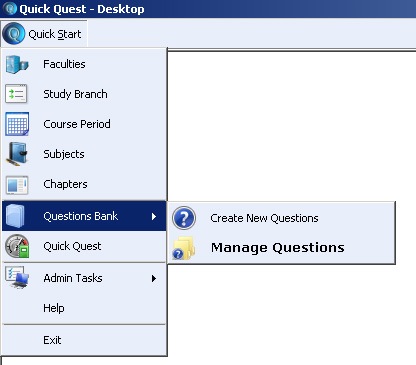
1. Quick Quest User Desktop: You have Quick Quest - “Quick Start” button which is similar to your Start Button in Windows and the Quick Start Menu which imitates Windows Start Menu. (Yes, placing [top-left-corner] of Quick Quest Start button is inspired from Ubuntu Linux)

clip_image001clip_image002

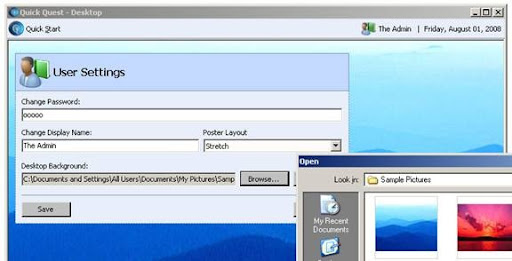
2. Customize your desktop: Make your Quick Quest Desktop more attractive by setting your favorite background image. The user setting screen offers different background image layouts such as Tile, Zoom, Stretched like what you see in Windows while setting wallpaper.

clip_image004

3. Minimize All at Once: By clicking minimize button of Quick Quest Desktop, you can minimize all its child windows including Quick Quest Desktop to windows Task bar.

clip_image006

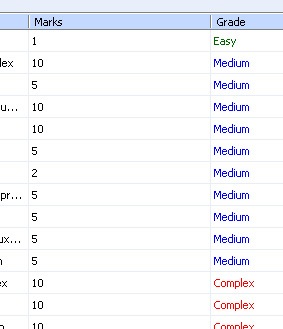
4. Sort Lists as you do in Windows Explorer: Click on List column header and the list gets sorted out on column content.

clip_image007

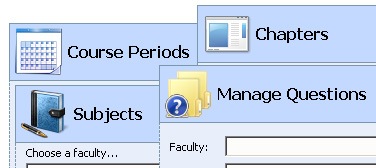
5. Neat Icons: A picture tells thousand words in shortest time so the screen header icons in Quick Quest.

clip_image008

6. Users and Levels: Different user types and functionality access rights.

clip_image009

7. Windows Explorer = Quick Quest Explorer: Windows Explorer is frequently used feature because of its wide accessibility to our files. Quick Quest Explorer is also with the same intent; any master setup entities can be quickly accessed and managed through this.

clip_image010

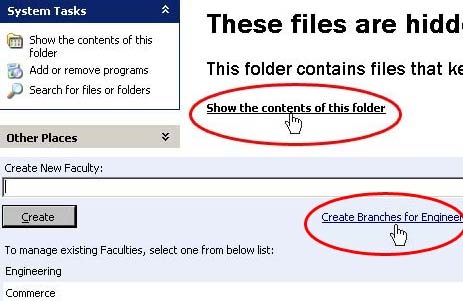
8. Quick Links: Windows XP features quick links very much similar to URL links on web pages. Quick Quest has such links on its master setup screens.

clip_image011

Note: screen shots demonstrated here are captured from Beta version of Quick Quest; final release may have slight changes.

Comparisons listed here are all about "look and feel". Functionally Windows and Quick Quest perform their own designated tasks which are entirely different from each other. What I tried achieving here is Quick Quest user should not feel anything new or different from his operating system as a result it make him feel comfortable using Quick Quest.